If a website shows your proxy's IP address, that does not mean every network request goes through it. The page may load through one exit, DNS may use your home connection, and WebRTC may connect over a third route.
Hello! Today we'll look at what DNS can reveal, why the exit provider's own DNS matters, how WebRTC name resolution can leak separately, and what to configure in BlankTrail Proxy to bring these routes together. We'll also explain why BlankTrail uses its own database of ISP DNS servers that serve only customers of their respective networks.
1. DNS is a separate part of the network picture
DNS translates a domain name into an IP address. An application asks a recursive resolver, which returns a cached answer or obtains it from other DNS servers. An authoritative server holds the records for a particular domain. For a home connection, the resolver is usually assigned by the ISP or network administrator, but the user can choose another one. This is explained, for example, in Cloudflare's documentation.
Loading a page and obtaining its address are different tasks. Configuring an HTTP or SOCKS proxy therefore does not, by itself, determine the route of every DNS request on the computer.
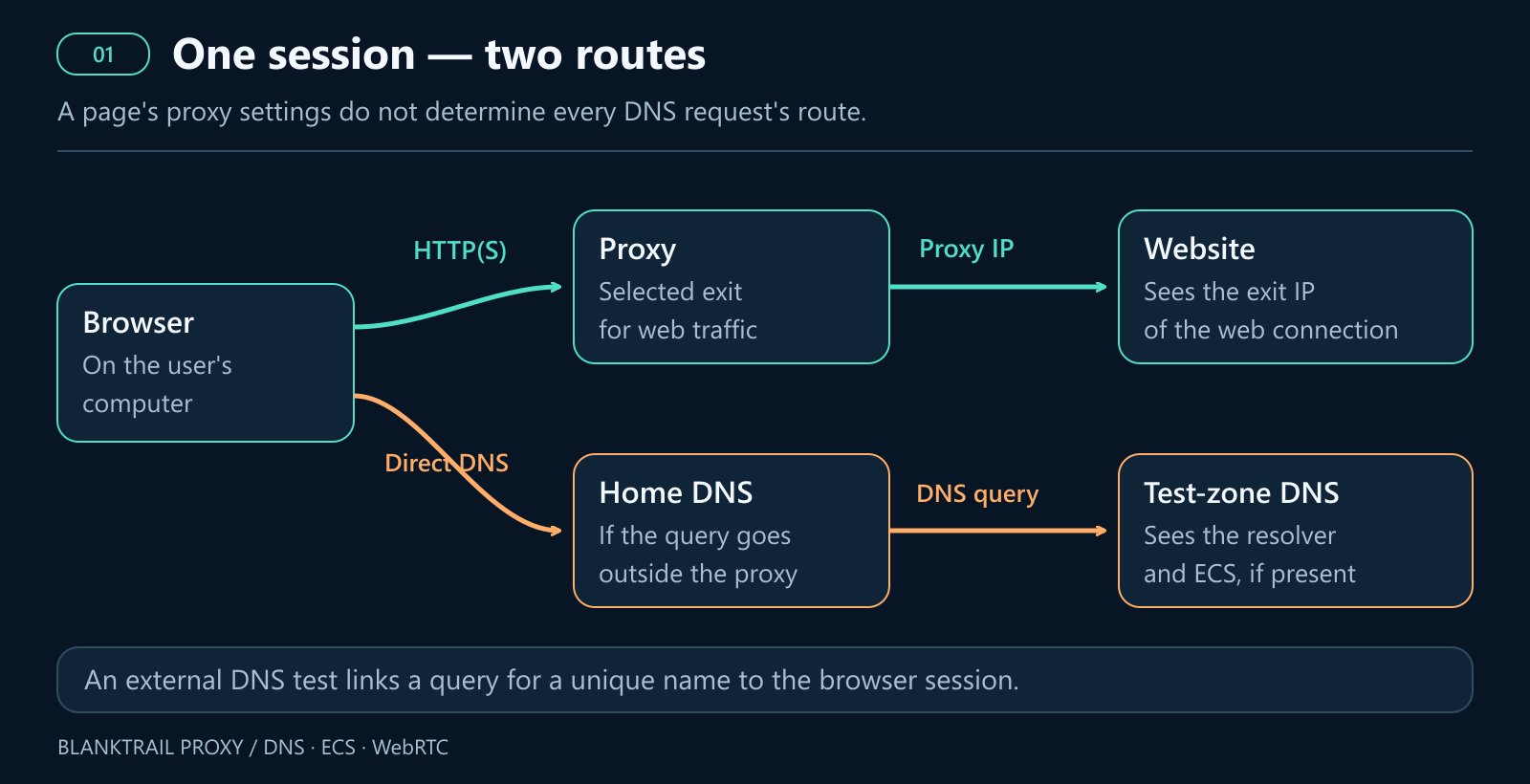
It helps to distinguish who actually observes the request. The recursive resolver sees the address that connected to it. The domain's authoritative server usually sees the recursive resolver's IP address; additional client information may be passed through ECS (EDNS0 Client Subnet, a DNS protocol extension that lets a DNS server pass on part of the user's IP address). If the client contacts the authoritative server directly, that server sees the address of this connection. These distinctions are covered in RFC 9076.
A website does not receive a list of your DNS servers in a standard HTTP header. For diagnostics, it can ask the browser to contact a unique subdomain in a controlled zone and associate the DNS observation with a particular session. This test reveals where the DNS request came from and whether it included ECS. That is why DNS can provide an additional signal when analysing a connection.
2. Why the exit ISP's DNS looks more natural
On a typical home or mobile connection, the IP address and DNS often belong to the same network environment: the ISP supplied both the address and the resolver. Historically, the network determined the system DNS, although applications can now choose their own services. This background is described in RFC 9076's discussion of resolver selection.
Imagine an HTTP request arriving from one ISP's residential IP, while a DNS check shows the user's home ISP resolver in another country. A system that correlates these signals has a question to answer: why do two requests from the same session belong to different connections?
The practical takeaway is that for a residential or mobile exit, its ISP's DNS often produces a more consistent picture. It matches the connection from which the website receives the main traffic. This is an argument about signal consistency, not a universal rule followed by every antifraud system.
Subscriber DNS and open resolver lists are different things
An ISP's recursive resolver may serve only customers on its own network, accepting requests from their connections and refusing outsiders. An open resolver, by contrast, responds to any client that can reach it. This distinction matters here: a subscriber network's DNS reflects the usual way of resolving addresses on that connection.
A public list of working DNS servers does not reproduce the exit ISP's DNS. Even if a listed server is in the right country or its IP is registered to an ISP, it may be open to everyone. Receiving an answer does not establish that it is the selected network's regular subscriber resolver. For an antifraud system that correlates IP addresses with DNS infrastructure, this substitution does not provide the consistency advantage that ISP DNS is intended to deliver.
A random open resolver on someone else's network can even look less natural than Google Public DNS. Ordinary users use Google DNS, so there is a familiar everyday explanation for that choice. Its widespread use is evident, for example, in APNIC Labs' May 2026 measurements: just under 10% of internet users worldwide use it, and more than 20%—one in five internet users— have Google DNS configured as a secondary or backup resolver. By comparison, a residential IP querying a little-known open resolver belonging to another operator does not become natural simply because both addresses are in the same country. This is a conclusion about consistency between signals; individual antifraud systems may weigh them differently.
Ordinary people also use public DNS. An ISP may outsource resolution, a browser may enable secure DNS, and a corporate network may use shared infrastructure. Google DNS or Cloudflare therefore does not, by itself, prove automation. However, according to the same APNIC Labs study from May 2026, Google DNS consistently accounts for around 6%–18% of total worldwide traffic, depending on the region, remaining the world's largest alternative public DNS provider. Only Cloudflare competes with it directly. That is still a small share compared with the overall population using their own ISP's DNS. In the eyes of antifraud systems, the connection's own ISP DNS adds a degree of trust: more than 80% of real users use it, while bots almost never have this kind of DNS.
The situation can be different for a datacenter proxy: its exit may have no suitable subscriber DNS. In that case, choosing an available, consistent resolution method makes more sense than trying to make the test display the name of a home ISP.
3. How DNS reveals an IP address or subnet
Contacting the resolver directly
If a DNS request goes directly from the home connection, the resolver sees its public IP. Behind a home router or CGNAT, this is the external address of that exit, not necessarily the computer's private address. A website receiving HTTP traffic through a proxy does not automatically learn the full home IP: it needs access to the relevant observation or another leak channel. However, major websites with antifraud systems measure and check this.
ECS: a subnet inside the DNS request
EDNS Client Subnet, or ECS, is an additional DNS field that carries information about the client's network. It helps select an appropriate CDN node. In doing so, it can also expose part of the address to the domain's authoritative server. RFC 7871 recommends truncating IPv4 addresses to 24 bits and IPv6 addresses to 56 bits to protect privacy.
For example, for the illustrative home IP 198.51.100.42, ECS may contain 198.51.100.0/24. This describes a range of 256 addresses rather than one specific IP. It still reveals the client's network and can help link observations across sessions. The prefix length depends on the implementation and settings; sending a full-length prefix exposes the complete address.
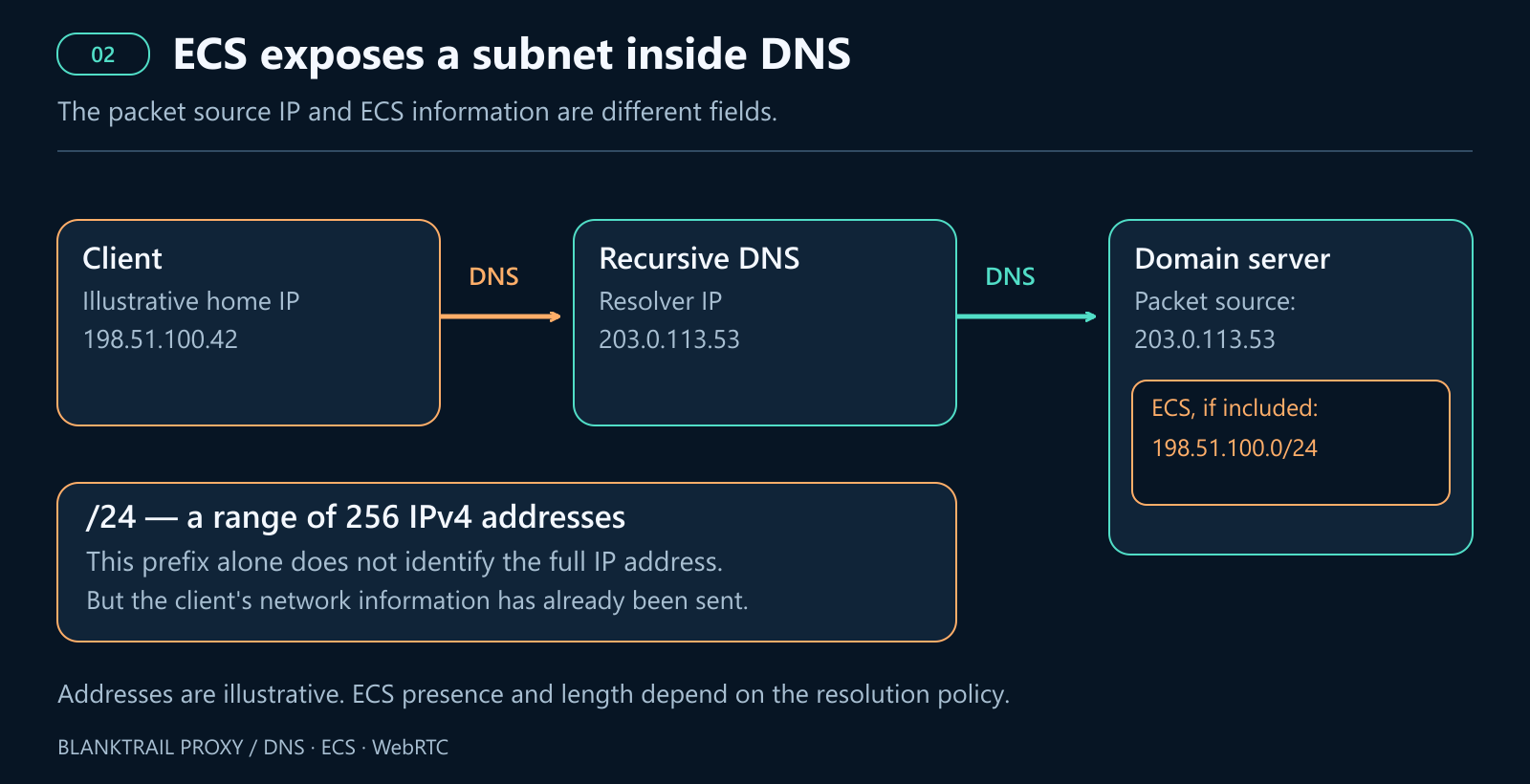
Google Public DNS supports ECS and detects whether authoritative servers support it. ECS is therefore not a mandatory field in every request through Google: its behaviour depends on the zone and server. See Google's ECS guidance. Cloudflare 1.1.1.1, by contrast, does not send ECS for ordinary domains; its documentation specifies an exception for Akamai's diagnostic domain.
The label “public DNS” therefore says nothing on its own about whether a request contains the home subnet. You need to inspect the ECS actually received. Conversely, even DNS sent through the correct tunnel can carry an unrelated subnet if the client added it beforehand and it survived forwarding.
Multiple routes and fallback DNS
Another source of problems is a mix of settings. The browser uses its own DoH, a system service uses the router's DNS, and a helper process uses a separate resolver. If the main path fails, a fallback may take over. IPv6 also needs separate attention: controlling only IPv4 does not describe what happens on the other stack.
The absence of ECS in one request, or a familiar resolver name in one test, therefore does not establish that every request from the application is protected.
4. WebRTC: name resolution first, connection second
WebRTC lets browsers communicate and exchange audio, video and data. When preparing a connection, the browser gathers ICE candidates: possible addresses and connection methods. STUN and TURN servers may be used in this process. The mechanism is described in WebRTC's guide to peer connections.
There are two independent stages that need to be checked separately.
Stage 1. Obtain the STUN or TURN server's IP
If the server is specified by a domain name, the browser first needs its IP address. This is a separate resolution call within WebRTC, not an HTTP page load. In Chromium, the P2P component creates a DNS request through HostResolver, as shown in the P2PSocketManager source code.
A separate call does not mean WebRTC always bypasses browser DoH: the components may share a resolution service. The actual path depends on the engine, its version and its settings. If the request reaches system DNS outside the protected route, a leak occurs before any STUN packet is sent. If the server is specified by IP, this resolution step is unnecessary; a cached answer can also hide a DNS request in a repeated test.
To check this, use a unique STUN server name in a controlled DNS zone. It reveals the route used to resolve the name specifically for WebRTC. An ordinary page DNS test is not a substitute.
Stage 2. Send the STUN request
Once the address is obtained, network communication begins. The STUN server sees the source of the incoming packet and returns the observed address and port to the client. This is STUN's role, not DNS's, and is described in RFC 8489.
If the packet goes directly, the server may see the full public IP of the home or mobile connection. A proxy setting for web requests does not guarantee WebRTC's route. For example, Chromium uses SOCKS5 for TCP URL requests, not for forwarding UDP; see Chromium's proxy documentation. The risk of STUN checks bypassing an ordinary proxy is also discussed in RFC 8828.
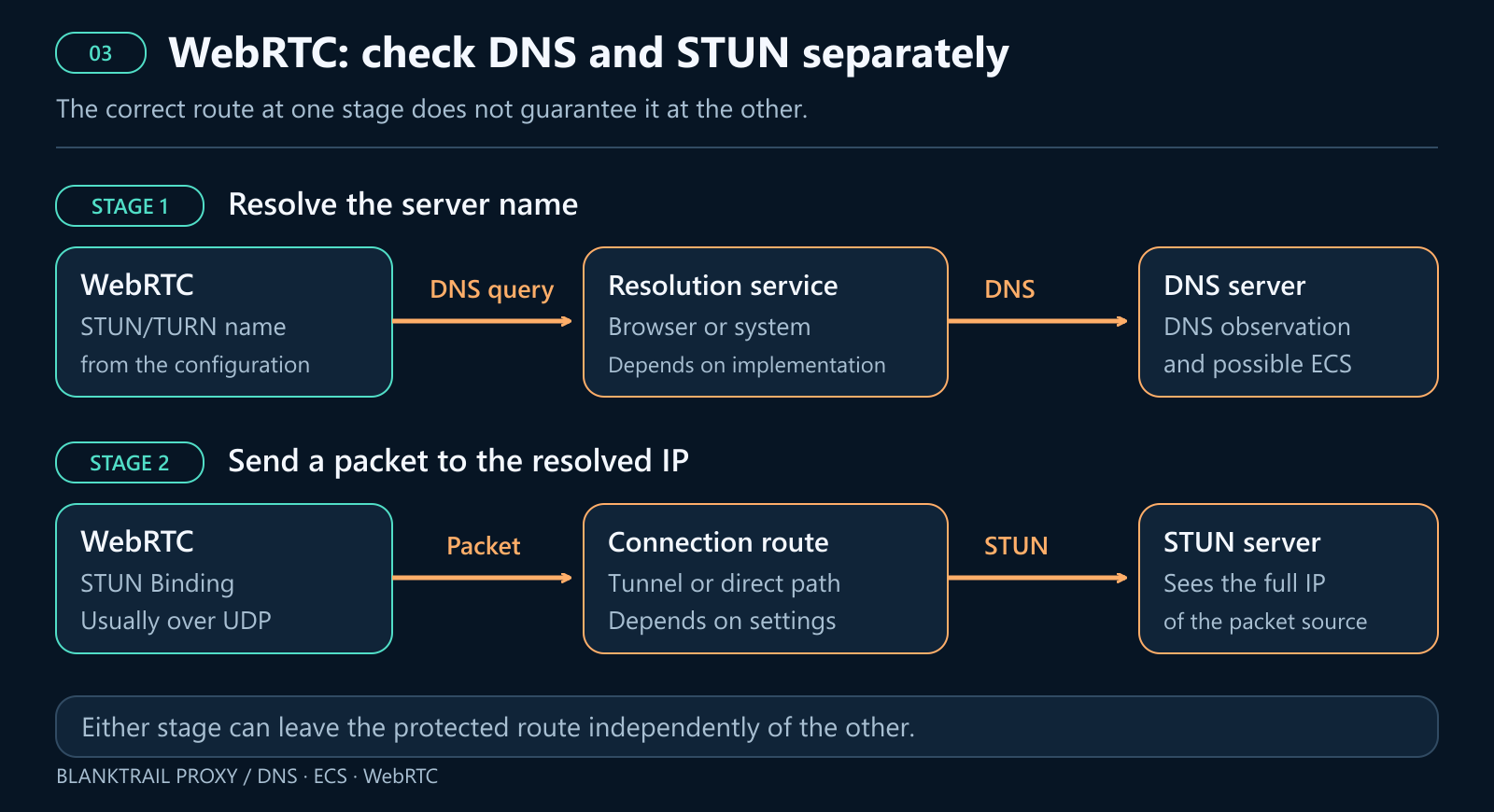
Both situations are possible: the STUN server's name resolves through the correct DNS, but the packet goes directly; or STUN passes through the tunnel while the preceding DNS request uses the home resolver. Fixing one stage does not automatically fix the other.
Replacing WebRTC addresses at the JavaScript level also does not change the source of a packet already sent. The server's observation remains independent. Similarly, mDNS names for local ICE candidates are intended to hide local addresses in the candidates being exchanged; that does not protect the external route. The idea is described in the IETF draft on mDNS and ICE.
5. Why DoH alone is not enough
DNS-over-HTTPS encrypts the request to the selected DoH server. Encryption does not choose the exit for you. If the connection to an external DoH service is direct, that service sees the direct connection's address. If the request carries ECS, HTTPS does not remove it.
Failure behaviour also needs checking. For example, Firefox's Default Protection allows a fallback to ordinary resolvers. Max Protection displays a warning when secure DNS is unavailable; domain exceptions can permit system DNS. This is described in Firefox's protection-level settings.
A controlled route requires three things: the chosen server, the correct path to it, and no unplanned fallback to home DNS. A browser's DoH setting applies to the requests it serves; it does not reroute all computer traffic or every WebRTC connection.
6. How BlankTrail Proxy addresses this
BlankTrail splits the task into two parts: selecting the correct resolution method and delivering the application's requests to it. WebRTC also requires control over the network communication itself.
vDNS: our own database of subscriber DNS resolvers
BlankTrail uses its own database of ISP DNS servers that serve only customers of their respective networks. Our database covers more than 4,000 ISPs and over 10,000 DNS servers. vDNS identifies the exit's ISP and location, then selects a suitable available resolver from this database.
Accessing subscriber DNS infrastructure through the corresponding exit is an important advantage of this approach. Public lists of open DNS servers contain resolvers that answer everyone; they do not provide the same connection between the exit and its ISP's regular resolver. The number of addresses in such a list does not, by itself, make the network picture more consistent.
Simply putting a subscriber DNS address in the computer's settings is not enough. From another network, that server may refuse recursion or not respond. The request must reach it through an exit belonging to the network it serves. The website then receives the main traffic from the proxy IP, while the DNS observation matches the infrastructure of that same connection.
If suitable ISP DNS is unavailable, other methods are possible: a public resolver carrying the exit subnet in ECS, independent resolution through the exit, or delegating the name to the upstream proxy. The choice depends on the exit type and the required DNS policy. With independent resolution, queries reach authoritative servers from the exit IP. This aligns the source, but does not reproduce use of a regular ISP resolver.
vDNS is enabled by default in BlankTrail. You can choose its operating mode in the port settings: on_leak applies vDNS after the preliminary check detects a DNS leak, while forced uses it continuously. When ECS is used, the subnet sent will match the selected exit. Enabling a strict policy for resolution errors prevents the connection from continuing over an unintended path. The default mode is auto, which prioritises ISP DNS servers. If none is suitable for the exit, it tries public DNS servers from Google, Cloudflare and Quad9. If even the public servers fail or filter access to the required website, the chain then tries resolution through the exit itself or delegates it to the proxy so it can attempt resolution on its side.
Our own DoH: delivering browser queries to BlankTrail
For DNS queries made independently by the browser, BlankTrail provides a DoH server on the product's port. You can enter its address in the secure DNS settings. The request is then handled through the exit, following that port's DNS policy.
Incoming client ECS is removed, and subsequent use of a subnet is determined by the port settings. This prevents a request from reaching the correct tunnel while still carrying the home subnet inside it.
Independent profiles can use DoH endpoints on different ports, each with its own exit. The browser needs a strict mode without automatic fallback to system DNS. Separately, check whether WebRTC resolution in that particular browser follows the same path.
TUN: covering system DNS and traffic outside the proxy
If an application makes some requests through a system service or cannot apply its proxy settings correctly, TUN interception is used. BlankTrail implements it on both Windows and macOS, including interception of individual applications. On Windows, an installed system service handles interception; on macOS, a system daemon managed by launchd uses the native utun tunnel interface. You can select the whole system or individual applications, with the interception scope configured per port. Details are available in the interception documentation.
On macOS, selecting an application takes its .app bundle into account, including nested helper processes. This is especially important for browsers: a separate helper inside the browser bundle may open network connections. The interception rule is matched to the application, not just to the executable of its main process; rules for parent processes are also considered when choosing the route.
Both platforms provide handling for ordinary system DNS queries. On macOS, BlankTrail configures system resolvers through the OS network configuration, which is used by the shared mDNSResponder service. Selecting a browser in the list of intercepted applications therefore does not, by itself, mean every DNS query it makes will be identified as traffic from the browser process.
In individual-application mode, enable system DNS capture separately and check the port serving it. If applications use different ports and exits, assign that port explicitly. This setting affects the shared system resolver: different applications can route their connections through different ports, but shared system DNS cannot automatically be treated as a separate DNS context for each browser profile.
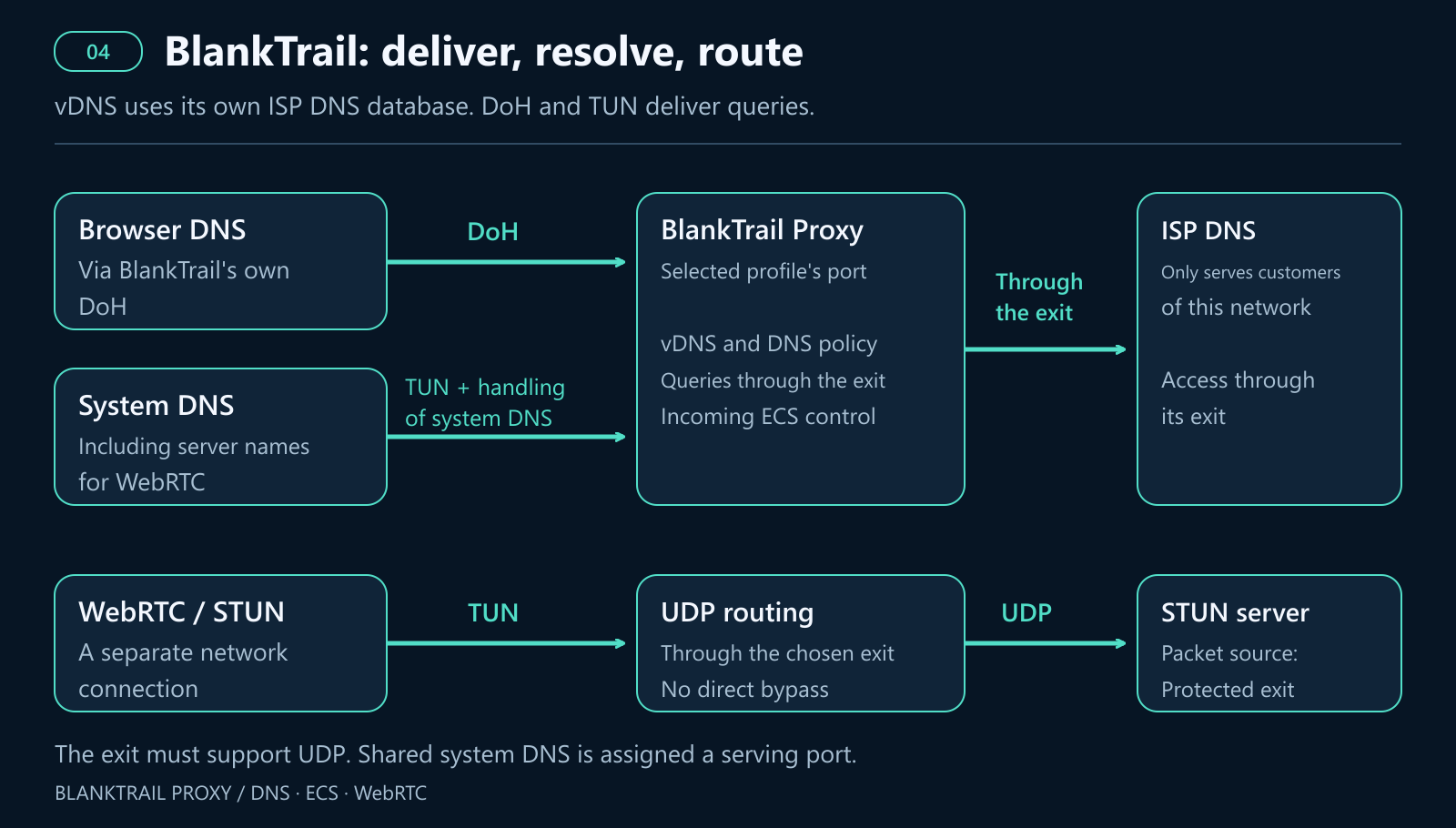
This interception can cover both WebRTC DNS queries, when they use the system resolver, and WebRTC's separate network connections. For STUN over UDP, the exit must support UDP, for example through a suitable tunnel or SOCKS5 UDP relay. An ordinary HTTP proxy is not sufficient.
If the protected exit does not support the required communication, the correct outcome is for that communication to fail, not to go directly through the home network. WebRTC functionality and the absence of leaks are therefore assessed separately. The built-in check for traffic bypassing the port can observe or block such traffic; vDNS, DoH and TUN address different parts of the overall task.
7. Reading the results: examples from the audit interface
Our audit.blanktrail.com detector displays a browser report in HTML and returns session data in JSON. HTTP clients have a separate /client JSON response. The browser report shows DNS observations, WebRTC addresses reported by the browser, and server-side STUN observations separately.
Below are three educational scenarios, rendered using the real audit page's functions and saved as static HTML. The IP addresses, countries, domains, query counts and verdicts are specified to explain the mechanism. These are not measurements taken “before and after” enabling BlankTrail. The fourth example is an anonymised response from a real HTTP client; its origin is stated separately.
In all three scenarios, the expected exit is 203.0.113.10 and its subnet is 203.0.113.0/24. The illustrative home address is 198.51.100.42, with home subnet 198.51.100.0/24. The exit resolver is shown as 192.0.2.53, and the home resolver as 192.0.2.54. These addresses come from example ranges and do not represent real connections.
Example 1. STUN uses the exit, but WebRTC DNS reveals another subnet
In the DNS table, the row containing p1 is an ordinary page probe: its resolver and ECS match the exit. The row containing rtc1 is a WebRTC name-resolution probe: it uses another resolver and the home subnet. The current script has four such probes, rtc1–rtc4, for STUN and TURN names using different transports. Only two DNS rows are retained in the example for clarity.
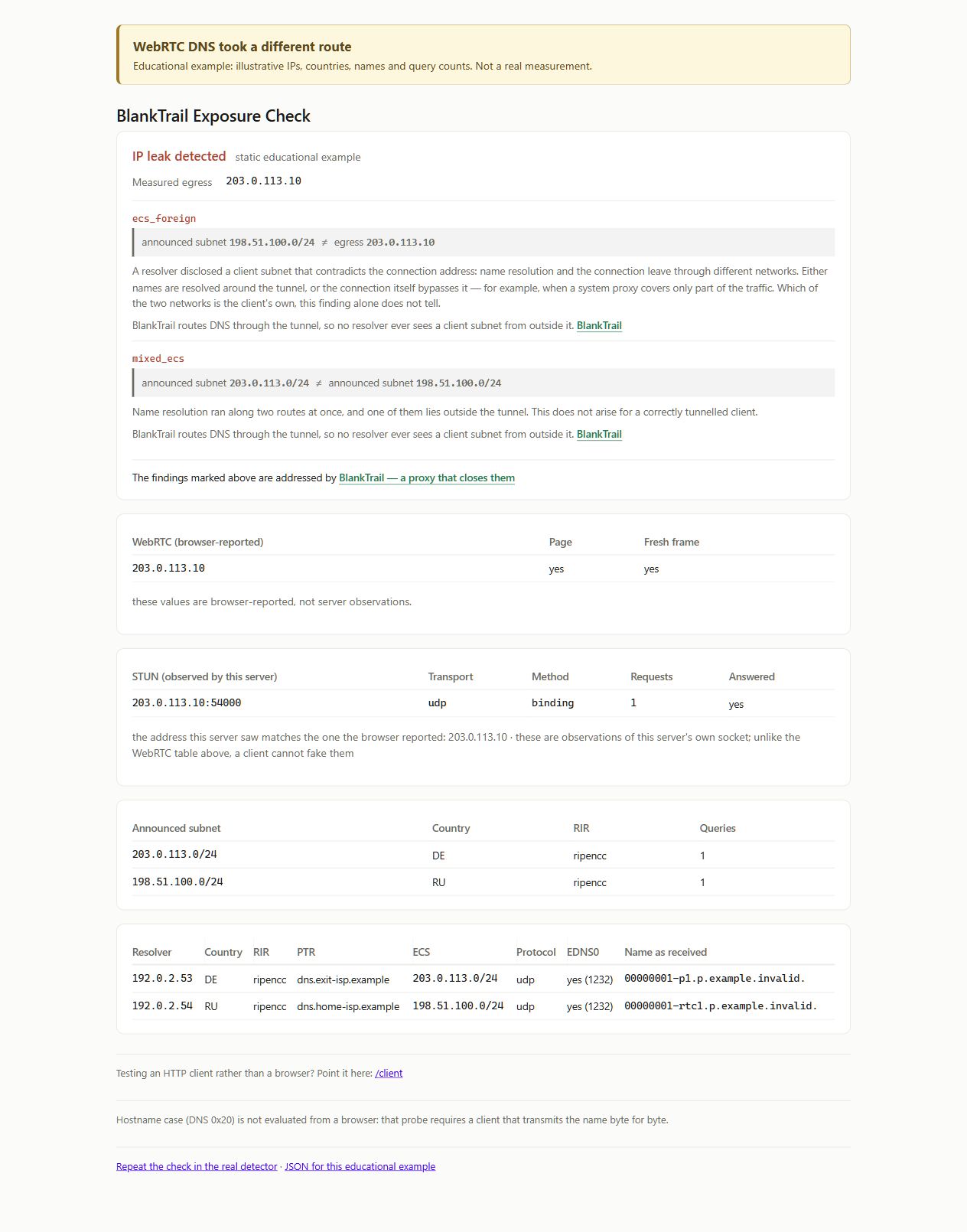
The ecs_foreign warning identifies a subnet that does not contain the main exit. mixed_ecs indicates that different ECS values occurred in one session. Meanwhile, the WebRTC table contains 203.0.113.10, and the STUN server observes 203.0.113.10:54000. In this scenario, the STUN exchange itself is consistent with the exit; the problem occurred during the preceding name resolution.
In a real check, inspect the rows themselves: different ECS values can also occur when the exit changes. The probe name helps identify which request belongs to WebRTC; a warning code alone cannot establish the cause.
Example 2. DNS is consistent, but STUN exposes the home IP
Now both DNS probes use the exit resolver and send its subnet. But the browser reports 198.51.100.42, and the STUN server sees a packet from 198.51.100.42:54000. The illustrative verdict contains the webrtc_foreign warning.
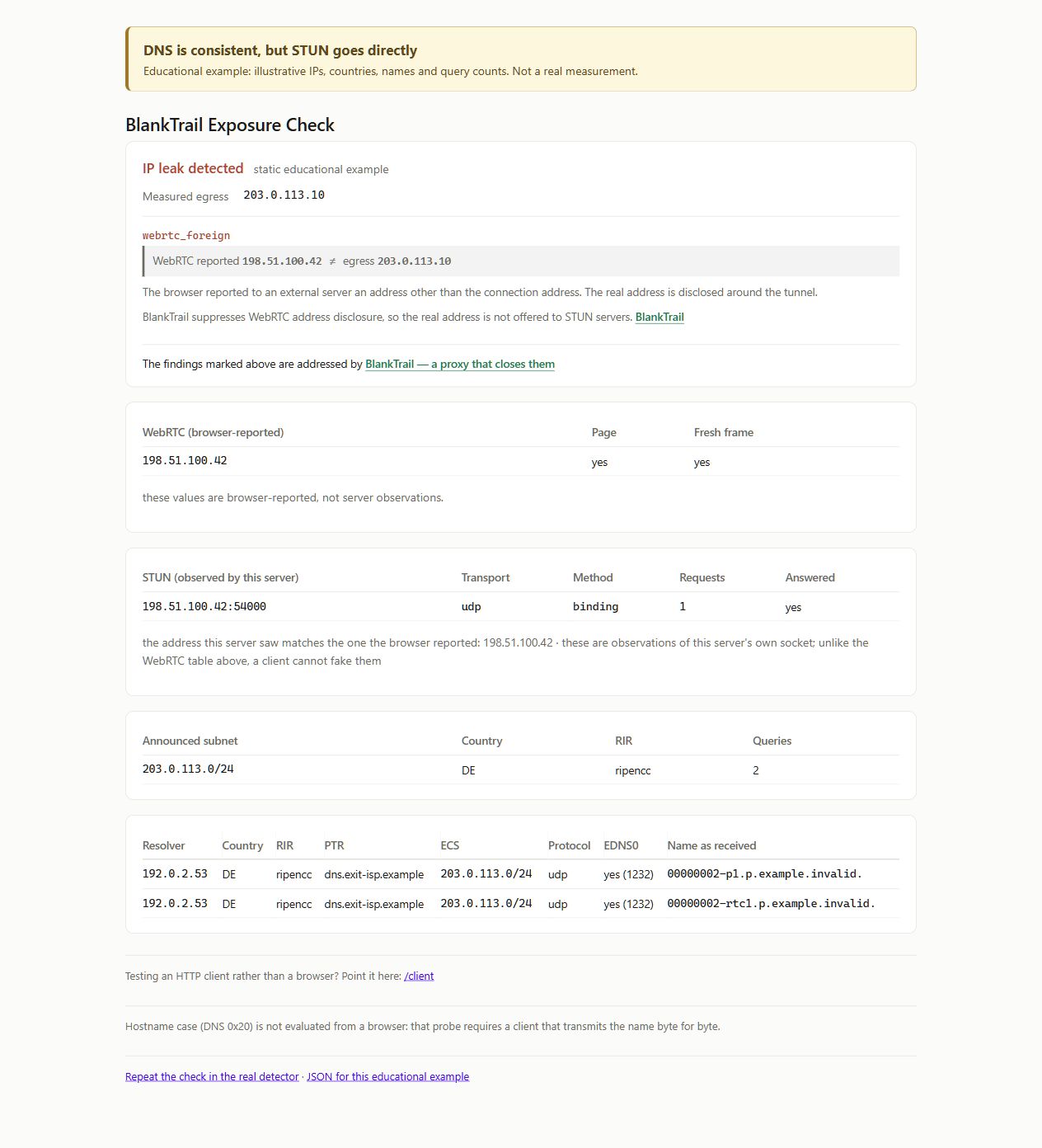
Fixing DNS alone is pointless here: the server address was obtained through the intended path, but the subsequent connection went directly. The server observation confirms the packet source independently of the table populated by browser JavaScript. This scenario requires control over WebRTC's route, for example TUN with a suitable exit and UDP support, or blocking unsupported communication.
Example 3. Every channel shown is consistent with the exit
In the third scenario, ordinary DNS and WebRTC DNS use the exit resolver, ECS describes its subnet, and both the browser and the STUN server show the exit address. The example includes the ISP DNS confirmation dns_resolver_native. It illustrates the corresponding interface message, not a lookup of the illustrative resolver in the real database.
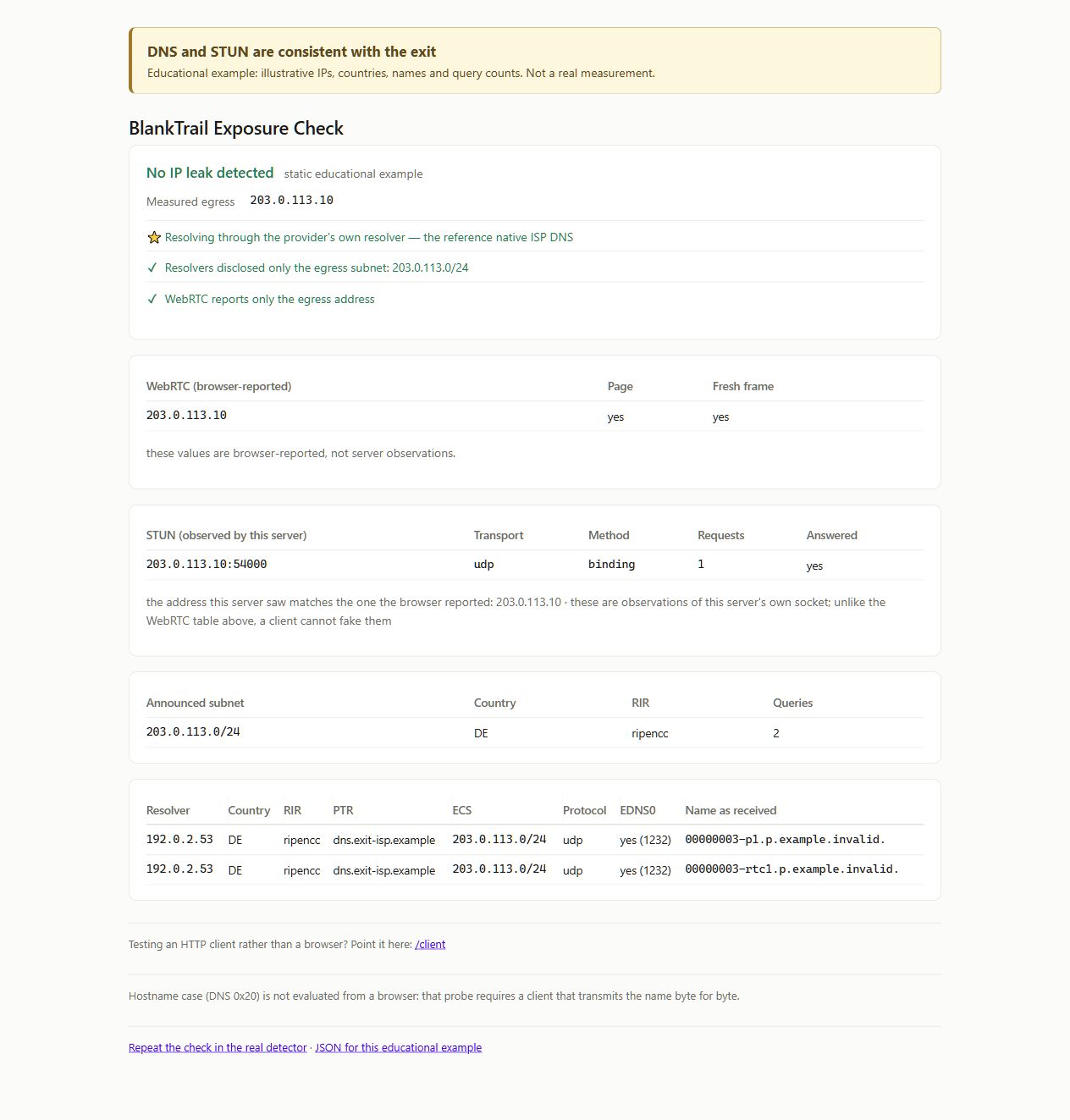
This is the expected picture with vDNS, DoH and TUN configured correctly for the scenario described. However, the green result applies to the observations collected in that particular session. It does not establish the behaviour of every application, every fallback route or future connections. If WebRTC is blocked, the absence of STUN packets must not be presented as confirmation that those packets passed through the exit.
Example 4. HTTP client JSON after the DNS probe
/client uses a different procedure. The first response contains the dns_probe_url field. Request that URL with the same HTTP client through the same proxy: the unique name triggers the DNS probe, and its response contains a dns block. Below is a real response to such a request. The client IP, its subnet, PTR and probe name have been replaced; the structure, public resolver and other values have been preserved.
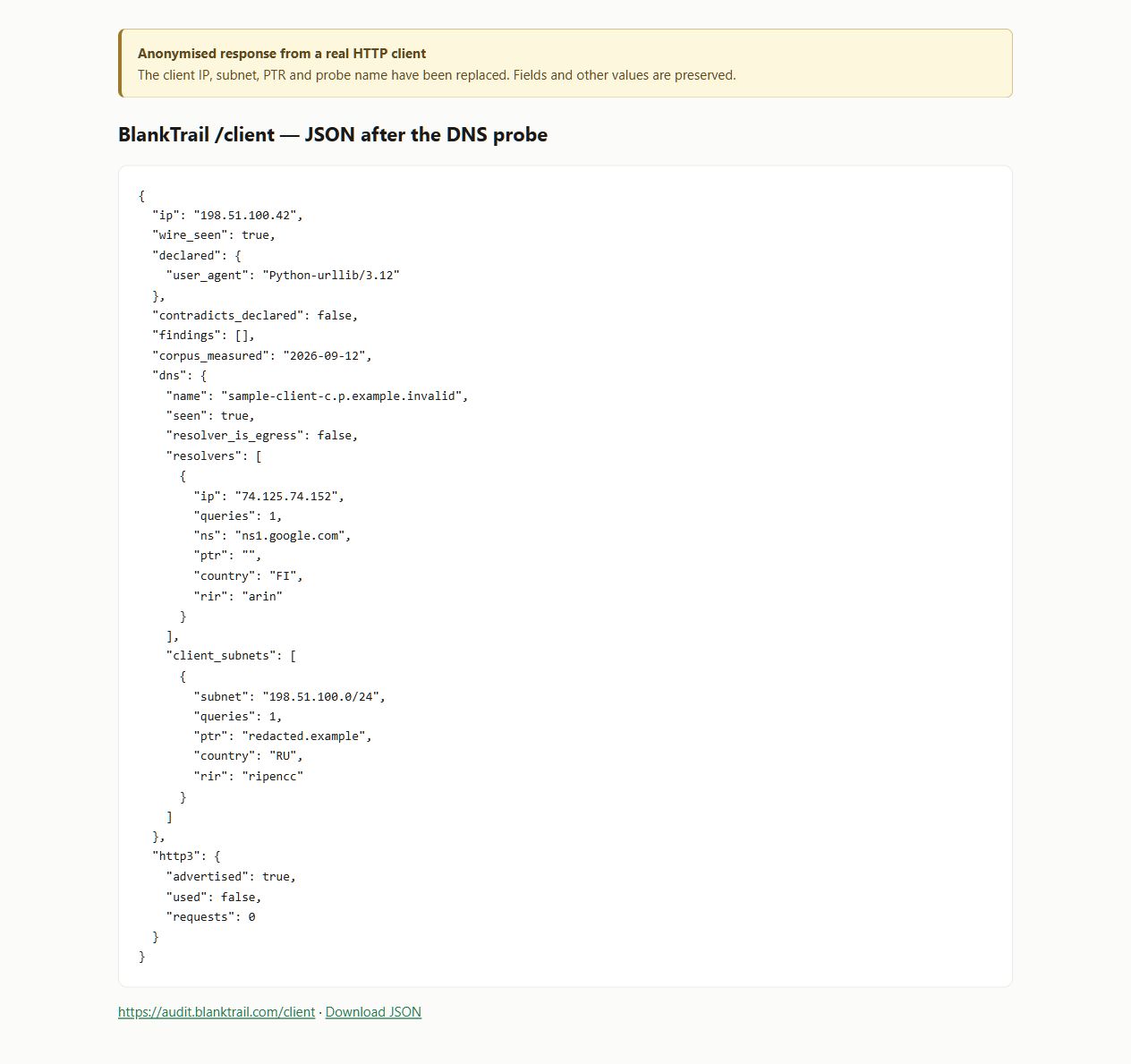
dns.resolvers describes the observed resolvers, while dns.client_subnets describes the client subnets sent. This response contains a Google public resolver and ECS. resolver_is_egress: false means the observed resolver's address did not match the HTTP client's address. That alone does not prove a leak, since the resolver is usually a separate server.
An empty findings array in this response is no substitute for DNS analysis and does not confirm the absence of WebRTC leaks. An ordinary HTTP client does not run browser ICE probes. Similarly, http3.used: false means HTTP/3 was not used in this check, not that DNS leaked.
8. How to repeat the check yourself
Run the check with a stable exit so that IP rotation is not confused with leaks. First record the browser and its version, proxy type, expected exit, vDNS mode, DoH settings and TUN scope.
- Open the browser detector in the profile being tested, through the required exit. Select English if needed and wait for the “completed” status.
- Check the measured exit. It should match the selected connection. Consider IPv4 and IPv6 separately; if rotation causes an address mismatch, repeat the test with a stable exit.
- Inspect the DNS table. Compare ordinary probe names with those containing
rtc1–rtc4. Check the resolvers, operators and actual ECS. A missing row means there was no observation, not that the route is confirmed to be protected. - Compare WebRTC and STUN. Read the browser-reported table and the server-observation table separately. Compare the STUN packet source with the measured exit. An address shown by JavaScript alone is not enough.
- Change the settings and start a new check. After enabling vDNS, setting DoH or configuring TUN, use “Run the test again” and wait for completion once more. A new session uses new diagnostic names. Save screenshots and JSON to compare the actual data.
- Check failure behaviour. If the selected DNS or tunnel is unavailable, a direct fallback route must not take over. Blocked communication and communication through the intended exit are different outcomes.
The browser session ID appears in the page log on the session … line. The full JSON is available at https://audit.blanktrail.com/api/session/<ID>: replace <ID> with your check's ID. You can examine observations, resolvers, client_subnets, webrtc, stun and verdict separately. The static HTML examples above were prepared from the audit interface; you do not need to look for a separate HTML export button to repeat the test.
Repeating the check with an HTTP client
Request /client using the actual client being tested. For example, with curl through SOCKS5, run this command, replacing the username, password and port with your own values:
curl --silent --show-error --proxy socks5h://USER:PASS@127.0.0.1:20134 https://audit.blanktrail.com/clientIn Windows PowerShell, use curl.exe to explicitly invoke curl. In socks5h://, the h means the hostname is passed to the proxy for resolution; see the curl documentation. This is a curl setting; it does not control a separate browser's DNS or WebRTC.
Copy the exact dns_probe_url value from the first JSON response and make a second request with the same parameters. In the following command, replace all the text inside the quotation marks with the returned URL:
curl --silent --show-error --proxy socks5h://USER:PASS@127.0.0.1:20134 "DNS_PROBE_URL_FROM_FIRST_RESPONSE"Save the second JSON and examine its dns block. If you are testing a programmatic client, make both requests using that client: a curl result describes curl's path. For WebRTC, return to the browser detector.
9. Conclusion
A consistent session starts with control over all its network routes. The main IP, page DNS, WebRTC DNS, transmitted ECS and STUN packet source should match the selected connection. Checking only the page's IP leaves the other channels unexamined.
For a residential or mobile exit, its ISP's regular DNS is especially important. BlankTrail's own database contains subscriber resolvers that serve only customers of their respective networks. Accessing them through a suitable exit lets you use the same DNS infrastructure as that ISP's subscribers. A random open server from a public list does not establish that connection, even if it is in the same country.
BlankTrail addresses these tasks through a combined configuration: vDNS selects the resolution method and uses the ISP DNS database, its own DoH server delivers browser queries to it, and TUN covers system DNS and separate application connections. For WebRTC, server-name resolution and the subsequent communication are controlled separately. If the exit does not support the required communication, it should be blocked without switching to a direct route.
Assess the result through actual observations: which resolver received the query, which subnet it sent, and which address the STUN packet came from. Open the BlankTrail detector before and after changing the settings, wait for each check to finish, and compare the reports. This shows which routes have been brought into alignment and where further configuration is needed.